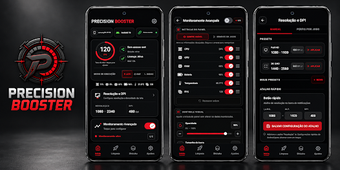
Precision Booster: Android app for display tuning and system telemetry
Monitors CPU and GPU load in real time while letting you assign per-app DPI and resolution profiles for targeted testing and visual tweaks. Developed by Fera Alpha for Android power users and mobile developers, the app merges monitoring, display configuration, and background-app management into a single workflow. Key capabilities include live telemetry (CPU, GPU, RAM, battery, temperature), custom resolution/DPI per application, and optional system-level commands through Shizuku or root. It fits users who test or optimise device behaviour under different display setups.
Designed for device-level testing and targeted display configuration
Booster groups system telemetry and display controls so a single session can both observe and change device state. The monitoring bar shows CPU, GPU, RAM, battery, temperature, and FPS in real time, and the app stores custom resolution and DPI profiles that apply automatically to selected applications. That combination supports workflows where you need to reproduce a visual or performance condition across multiple app launches.
How the app structures a typical workflow for tuning and validation
Profiles let you assign resolution, DPI, and screen ratio to a specific application, then test that configuration while watching live metrics. Color profile and intensity controls alter output for visual checks, and background application management clears processes to measure isolated performance. The app therefore frames a workflow: create a profile, apply it to an app, run the app, observe telemetry for validation.
Interface and learning curve for non-root and advanced setups
The UI exposes technical controls that require some familiarity with Android display concepts; settings are accessible but granular. Advanced configuration commands run through Shizuku or root access when the platform restricts direct changes, which means some features need extra setup outside the app. Templates or guided wizards are not mentioned, so expect hands-on adjustment rather than guided onboarding.
Compatibility and performance considerations across devices
Feature availability depends on Android version and device vendor, so not every device will accept every resolution or DPI change. The app reports real-time telemetry, which helps identify when a device refuses a configuration or shows thermal or battery impact. Because it combines monitoring with direct display changes, it serves as a single test tool for validating hardware and visual layout differences across multiple devices.
Best suited to technically minded testers; casual users should choose simpler telemetry tools
Precision Booster rewards users who test device behaviour and adjust display parameters directly, offering a compact environment for iterative tuning and validation. It is appropriate for mobile developers and experienced power users who run configuration experiments across apps and devices. Less technical users may find the granular controls and device-dependent setup demanding, so choose Booster only if you plan to spend time experimenting with profiles and system commands.